


Do you remember when backup cams were first installed in vehicles? Rewind all the way back to the early models, and you’ll find grainy video footage that only captured a very narrow slice of space behind you.
If you weren’t careful, a stray pedestrian who was just out of range when you started backing up (and weren’t paying attention) would suddenly pop into the frame. You’d slam on the brakes to avoid hitting them and then watch them walk on by, oblivious to the fact that they almost gave you a heart attack.
Well, backup cams have come a long way since then and are now standard on vehicles. So, it’s no surprise that RVs have also integrated them into their systems. From wireless backup cams to night-vision-enabled cams to low-light backup cams, we’re taking a look at the features of the best RV backup cameras.
Which features do you need, and which aren’t important to you?
Key Takeaway
When selecting an RV backup camera, look for features like a wide viewing angle, crystal-clear, real-time images, and strong wireless resistance.
Wireless vs. Wired Backup Cameras: Which Is the Best Choice for Your RV?
Deciding between a wired or wireless backup camera is a logical way to narrow down what you’re looking for in a camera system, but not surprisingly, it’s more complicated than that.
Your choice between a wireless and a wired backup camera should ultimately depend on your RV type–but there are some general pros and cons to be aware of.
Let’s start with the cons. The major downside of wireless systems is that Wi-Fi interference can cause a laggy picture. For wired systems, it’s the headache of having to install wiring in your RV.
If you have a long RV or are towing a long trailer (we’re talking 30+ feet), you may assume that you need a wired system because wireless systems tend to be unreliable over distances. Likewise, if you don’t trust yourself to install wiring, you may default to wireless.
But manufacturers have already solved those problems.

As for the strengths of wireless systems, like the Halo View Byte Tango 7, you can now keep a consistent wireless connection at speeds of 74 mph on the interstate from a distance of 948 ft. Yeah, I don’t think you’re towing anything quite that long, but you get the picture.
Manufacturers found that the key to cutting down on interference is making sure your wireless system has a digital signal that won’t compete with the plethora of Bluetooth devices on the road.
So, even if you have a long RV, a wireless system can still be an option. Just check the range before you buy. Oh, and did I mention that you can use solar power to charge it?
What about wired installations? Is it really that involved? If you have to install the wires, yes, it’s a more involved process that could take an afternoon of work. (And I say if because there’s a chance you may not have to).
Enter Furrion. Furrion is a backup camera manufacturer that makes exceptional systems. (We’ll talk about the Furrion Vision S later.) And they partner with several RV brands to preinstall wiring for their backup cams. While the dealer offers a Furrion System as an upsell, you can use that same wiring to hook up your own wired backup camera.
So, if the cons of wired and wireless systems are solved, then how do you choose which is the best RV backup camera for you?
Let’s move on to the top features to look for.
Top Features to Look for in an RV Backup Camera
Now, it’s time to pick apart what features are truly helpful and what features are unnecessary. Here are the key features:
- The field of view
- Image clarity and quality
- Night vision capabilities
- Real-time transmission
- Multiple cameras
- Audio assist
- DDR Playback
- Motion Sensors
The best RV backup systems must deliver clarity, speed, and reliability. Rest assured that our recommendations check all those boxes.
Everything else depends on your preferences. Do you want your rear camera to double as a rearview mirror? Do you appreciate the peace of mind that comes from having DDR Playback and motion sensors? Do you often arrive at your campsite after dark?
These are the questions you have to ask yourself before deciding on a wireless camera or wireless system.
Feature #1: Wide Field of View
Remember those first-generation backup cams I mentioned? Yeah, they had a narrow field of view, which caused problems and safety risks galore. But today, backup cameras now have extended ranges from 130 to 180 degrees.
Best Field of View Recommendation: The eRapta AY7 Backup Camera

- 149-degree view
- Night vision
- Wired
- 7 in. 1080 P
Starts at $50
Feature #2: Great Image Clarity and Quality
Image clarity and picture quality are non-negotiable. You need to know if that’s a shadow or a stump you’re about to hit.
When looking at high-definition resolution, generally 1080p or higher produces images clear enough to identify small obstacles. A higher number of horizontal pixels increases the sharpness of the image – which is helpful but less important for backing-up purposes.
Our Recommendation for a Back-up Camera With Great Image Clarity: The Fookoo Ⅱ HD 9″ Backup Camera System Kit
Recommendations:

- 170-degree view
- Wired
- Nightvision
- 9 in. 1080P
- Waterproof and temperature-resistant
Starts at $210
Feature #3: Night Vision Capabilities
Do you always seem to find yourself showing up to your campsite after dark? No one likes having to back into a spot in the dark.
Thankfully, a backup camera that uses infrared lights or special low-light features can cut through the darkness–which means you’ll always have a clear view of what’s behind your vehicle.
And in the rare event you need to reverse in complete darkness, you’ll be grateful for the extra set of eyes that ensure the safety and integrity of your RV.
Recommendation:
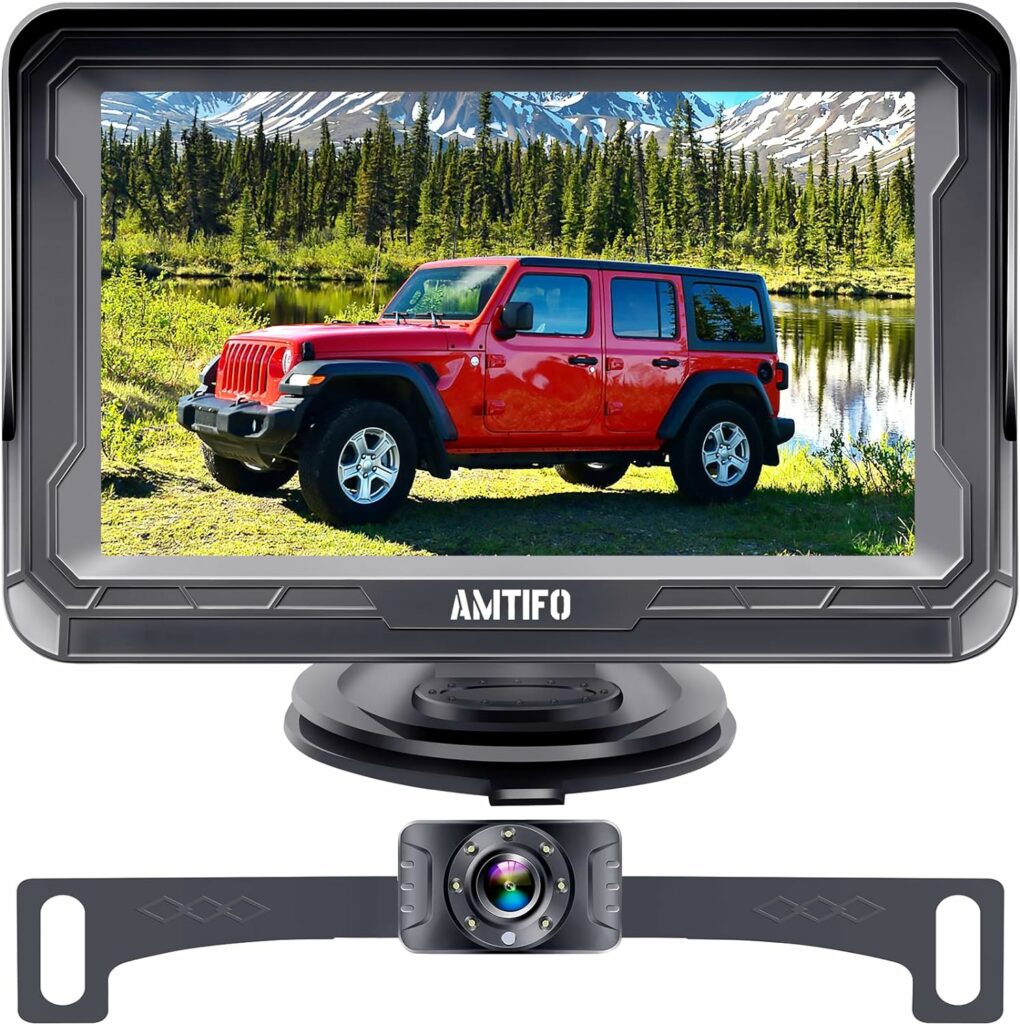
- Color night vision
- 4.3in HD display 1080p
- Multiple camera views
Feature #4: DDR Playback Capabilities
If you’re ever in a car wreck that’s not your fault, having footage of the incident can be the difference between conviction and absolution. Hopefully, you won’t need it. But it’s there if you do.
And on a day-to-day basis, if you also use your cameras for security (we’re getting to that), then being able to play back footage of an attempted break-in can also help the police.
Our Recommendation for a Back-up Camera With DDR Playback Capabilities: Byte Tango 7 Solar Wireless 1080P Solar Powered Backup Camera
- Wireless (up to 948ft)
- 4 cameras
- Full color, dim light night vision
- DDR Playback
- Ultra-wide view
Starting price: $520
Feature #5: Audio Assist and Motion Sensors
Sometimes, you just need to do things the old-fashioned way. Even with the best backup cams, there are other obstructions you have to watch out for when backing up, like tree branches or low shelters. Enter a spotter. With audio assist built-in to your camera of choice, you’ll be able to listen to your spotter without hanging your head out the window.
When coupled with built-in motion sensors (that power the camera after detecting motion), you’ll also have a built-in security system to protect your investment. In the event of a potential break-in, the sensors will flip on the lights and start recording, deterring potential thieves.

Our Recommendation for a Camera with Audio Assist and Motion Sensors: Furrion Vision S® RV Camera System
- Wireless
- User-friendly interface
- 3 cameras
- Audio transmission
- Motion sensing for security
- No drill installation
- Anti-glare screen
Starting Price: $500
Feature #6: Multiple Camera Setup
Systems come with 1-4 cameras. You may think, “If you have a wide enough view, why do I need more than one?” While the cam on the back of your RV is the most important, wouldn’t it be nice to see the trailer hitch when you’re backing up to it? Also, for longer RVs, having that extended side view can be helpful during tricky parking drills.
So think about when you’re backing up your RV. Could you benefit from more than one view?
Feature #7: Real-Time Transmission
Real-time transmission requires a steady connection. This is essential for those who want to use their wireless cameras as rearview mirrors while they’re driving.
Summary
Now that you’ve upgraded your vision, where do you plan to keep your RV safe when you’re not using it?
Store it with Neighbor – a peer-to-peer RV storage marketplace offering RV storage that’s up to 50% cheaper than traditional storage options. With Neighbor, you can find RV storage options in all 50 states.
You’ll even find storage spaces in your very own neighborhood. Find listings (from pre-screened hosts) nearest you!
Frequently Asked Questions
Can Wireless Backup Cameras Interfere With Other Devices?
Yes, wireless backup cameras can experience interference from various devices such as Wi-Fi networks, Bluetooth systems, GPSes, and electronic devices in nearby vehicles, so it’s essential to choose a camera with strong signal resistance. As an extra precaution, consider its placement to minimize interference.
Is It Better to Mount an RV Backup Camera High or Low on the Vehicle?
It’s better to mount your RV backup camera at a high point, centered at the rear of the vehicle. This position offers the widest and most comprehensive view, reducing blind spots and allowing for safer maneuvering.
How Often Should I Check My RV Backup Camera System?
You should check your RV backup camera system before each trip to ensure safety and reliability. Regular checks are also important to ensure that all connections are secure and the system functions correctly.
Can I Use My Smartphone as a Monitor for My RV Backup Camera System?
Yes, you can use your smartphone as a monitor for your RV backup camera system, thanks to the wireless transmitters and smartphone apps provided by modern RV backup camera systems.